

Close Menu
XiaoMaiPei | Mobile Phones,Phone Accessories,Smart Cars,Smart Devices,Internet,Digital,AI,Artificial Intelligence,Intelligent Wearable.

    Subscribe to Updates

    Get the latest creative news from xiaomaipei.com.

    Facebook X (Twitter) Instagram
    XiaoMaiPei | Mobile Phones,Phone Accessories,Smart Cars,Smart Devices,Internet,Digital,AI,Artificial Intelligence,Intelligent Wearable.XiaoMaiPei | Mobile Phones,Phone Accessories,Smart Cars,Smart Devices,Internet,Digital,AI,Artificial Intelligence,Intelligent Wearable.
    • Home
    • AI
      • Intelligent Wearable
      • Video
      • Work
    • Mobile
      1. Phone Accessories
      2. Phone cases
      3. View All
      8.9

      Samsung Galaxy S25 Ultra: The Ultimate Flagship Experience

      31/03/2025

      Production of iPhone 14 Costs 20% More Than iPhone 13

      22/01/2022

      Massive Discount on Xiaomi Mi Note 10 – 6GB RAM/128GB Storage at Special Price

      15/03/2021

      Beyond Phones: Why Samsung’s CES 2026 Showcase Will Steal the Spotlight

      16/12/2025

      Trump Tariffs Could Increase iPhone Prices by 40%: Consumer Impact Analysis

      11/06/2025

      Best Samsung Phones 2024: Top Models for Every Budget

      11/06/2025

      Apple WWDC 2025: Everything to Expect From iOS 19 to Major AI Updates

      21/05/2025
    • How to use

      How to Use Google Password Manager on iPhone: The Complete Guide

      27/04/2025

      How to Disable Smart Shuffle on Spotify: Regain Control of Your Playlists

      25/04/2025

      My Experience with a Tiny iPad Mini Keyboard: A Mixed Bag

      16/04/2025

      Should You Get a Bluetooth Turntable?

      05/04/2025
      8.9

      Samsung Galaxy S25 Ultra: The Ultimate Flagship Experience

      31/03/2025
    • Buying Guides
    Facebook X (Twitter) Instagram TikTok
    XiaoMaiPei | Mobile Phones,Phone Accessories,Smart Cars,Smart Devices,Internet,Digital,AI,Artificial Intelligence,Intelligent Wearable.
    Home»How to use»Methods to Minimize Game Stuttering on Windows 11
    How to use

    Methods to Minimize Game Stuttering on Windows 11

    xiaomaipeiBy xiaomaipei08/12/2024Updated:09/04/2025No Comments3 Mins Read
    Facebook Twitter Pinterest LinkedIn WhatsApp Email
    Share
    Facebook Twitter LinkedIn Pinterest Email

    Game stuttering in Windows 11 can ruin even the most powerful gaming setups. This guide combines proven system optimizations with advanced troubleshooting techniques to eliminate frame rate inconsistencies and deliver buttery-smooth gameplay :cite[1]:cite[2].

    1. Optimize Windows 11 Gaming Settings

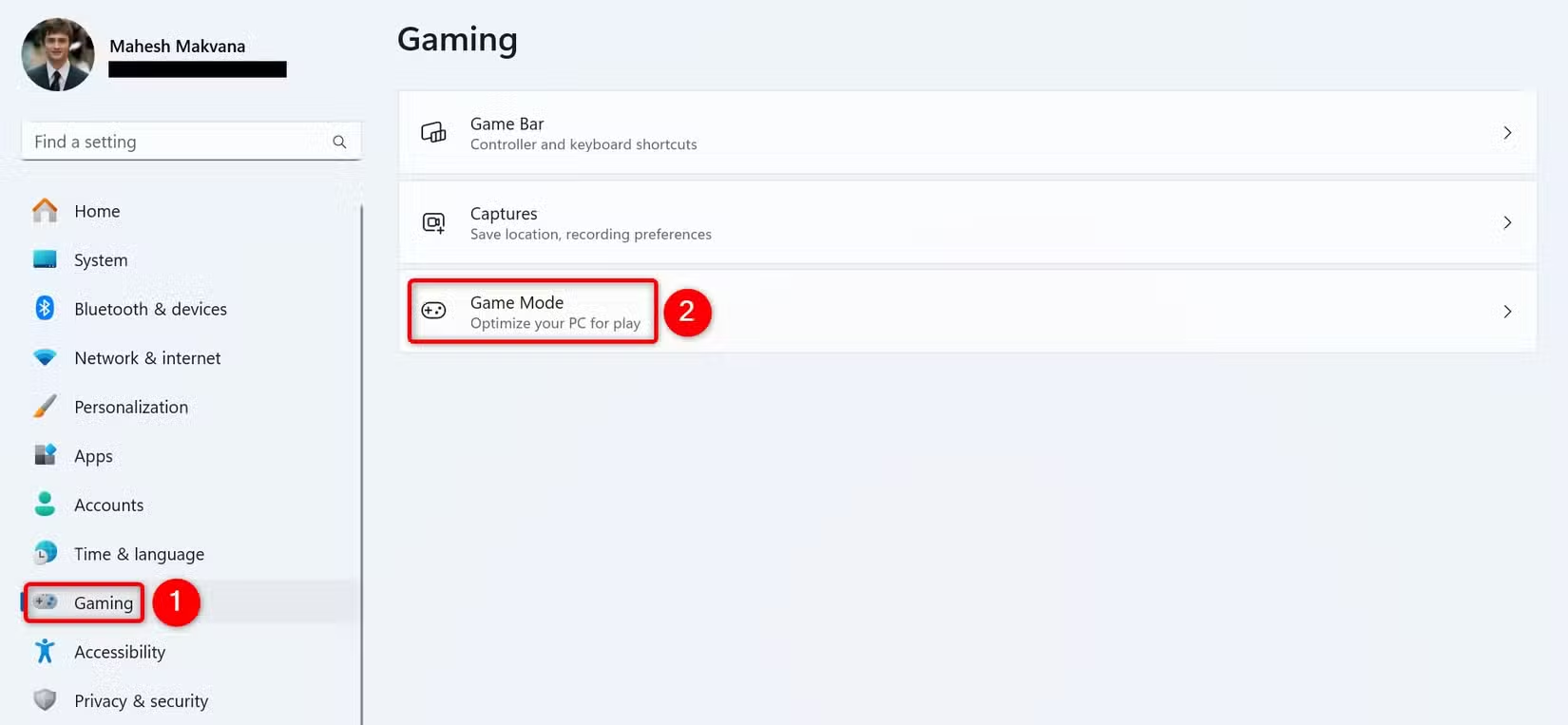
    Game Mode: Windows 11’s Game Mode should theoretically improve performance by prioritizing system resources for games. However, some users report better stability with it disabled :cite[2].

    1. Press Windows + I to open Settings
    2. Navigate to Gaming > Game Mode
    3. Toggle Game Mode and test performance in both states

    Graphics Preferences: Designate your dedicated GPU for gaming applications:

    1. Settings > System > Display > Graphics
    2. Browse to add your game’s .exe file
    3. Set graphics preference to “High performance”

    2. Update and Optimize Drivers

    Outdated or incorrect drivers are among the most common causes of stuttering:

    • GPU Drivers: Always download directly from NVIDIA/AMD/Intel
    • Chipset Drivers: Update from motherboard manufacturer’s site
    • Network Drivers: Crucial for online gaming stability

    For NVIDIA users, try these control panel settings:

    • Power Management Mode: Prefer Maximum Performance
    • Texture Filtering – Quality: High Performance
    • Vertical Sync: Use the 3D application setting

    3. Manage Background Processes

    Windows 11 includes many background services that can interfere with gaming:

    1. Press Ctrl+Shift+Esc to open Task Manager
    2. Sort by CPU, GPU, and Memory usage
    3. End non-essential tasks (avoid system processes)

    Common Culprits:

    • Discord overlay
    • Game recording software
    • Antivirus scans
    • Windows Update

    4. Network Optimization for Online Games

    Network-related stuttering appears as sudden lag spikes or rubberbanding:

    Wired Connection

    Ethernet provides lower latency and more stable connections than Wi-Fi. If stuttering occurs during online play, switching to wired can make a dramatic difference :cite[2].

    Wi-Fi Optimization

    If wired isn’t possible:

    • Use 5GHz band instead of 2.4GHz
    • Enable QoS in router settings
    • Position closer to router

    Windows Network Tweaks:

    1. Disable Large Send Offload (LSO): netsh int tcp set global rss=disabled
    2. Set network profile to Private (not Public)
    3. Disable IPv6 if not needed

    5. Advanced System Tweaks

    Power Plan Settings:

    1. Control Panel > Hardware and Sound > Power Options
    2. Select “High performance” or create custom plan
    3. Set minimum processor state to 100%

    Disable Fullscreen Optimizations:

    1. Right-click game shortcut > Properties
    2. Compatibility tab > Disable fullscreen optimizations
    3. Check “Run as administrator”

    Shader Cache Management: Clear old cache files that may cause conflicts:

    • NVIDIA: Manage 3D Settings > Shader Cache Size
    • AMD: Radeon Software > Graphics > Advanced > Reset Shader Cache

    6. Hardware Considerations

    When software fixes don’t resolve stuttering, hardware may be the limitation:

    • RAM: 16GB minimum for modern games, ensure dual-channel configuration
    • Storage: NVMe SSDs reduce asset loading stutter
    • Thermal Throttling: Monitor CPU/GPU temps (below 85°C under load)
    • Power Supply: Insufficient power can cause performance drops

    Game-Specific Fixes

    Some games benefit from particular tweaks:

    • VSync: Try disabling in-game and forcing through driver
    • Frame Rate Caps: Limit to monitor’s refresh rate
    • Resolution Scaling: Reduce render resolution before lowering quality

    For games using Steam’s in-home streaming, additional optimizations may be needed to reduce latency and stuttering :cite[2].
    Conclusion: A Methodical Approach

    Eliminating game stuttering requires systematic troubleshooting:

    1. Establish baseline performance metrics
    2. Implement changes one at a time
    3. Test thoroughly after each adjustment
    4. Document results to identify effective solutions

    Most stuttering issues can be resolved through these software optimizations, though hardware upgrades may be necessary for severely underpowered systems. Remember that some stuttering may be inherent to certain game engines or online multiplayer environments.

    Popular
    Share. Facebook Twitter Pinterest LinkedIn Email

    Related Posts

    Unlock Your Notes: Google Connects Gemini AI to NotebookLM

    16/12/2025

    Trump Tariffs Could Increase iPhone Prices by 40%: Consumer Impact Analysis

    11/06/2025

    Best Samsung Phones 2024: Top Models for Every Budget

    11/06/2025

    Huawei Watch Fit 4 Pro Review: Fitness Tracker or Smartwatch?

    11/06/2025

    Can AI Really Replace Your Keyboard and Mouse? The Future of Computer Input

    11/06/2025

    Apple WWDC 2025: Everything to Expect From iOS 19 to Major AI Updates

    21/05/2025
    Don't Miss
    Mobile

    Beyond Phones: Why Samsung’s CES 2026 Showcase Will Steal the Spotlight

    16/12/2025

    While the world eagerly awaits the next Galaxy smartphone, the real stage for Samsung’s…

    Unlock Your Notes: Google Connects Gemini AI to NotebookLM

    16/12/2025

    Trump Tariffs Could Increase iPhone Prices by 40%: Consumer Impact Analysis

    11/06/2025

    Best Samsung Phones 2024: Top Models for Every Budget

    11/06/2025

    Huawei Watch Fit 4 Pro Review: Fitness Tracker or Smartwatch?

    11/06/2025

    Can AI Really Replace Your Keyboard and Mouse? The Future of Computer Input

    11/06/2025

    Subscribe to Updates

    Get the latest creative news from xiaomaipei.com.

    Stay In Touch
    • Facebook
    • Twitter
    • Pinterest
    • Instagram
    About Us
    About Us

    XiaoMaiPei | Mobile Phones,Phone Accessories,Smart Cars,Smart Devices,Internet,Digital,AI,Artificial Intelligence,Intelligent Wearable.; From phones, AI, laptops, autos, smart home, Intelligent Wearable,AIvideo games and entertainment, we’ve tested all of the latest products and tech for the way you live.

    Email Us: [email protected]
    Contact: +86-13963106845
    Address: Room 204, No. 64 Yugang Road, Huancui District, Weihai City, Shandong Province,China

    Facebook X (Twitter) Instagram YouTube TikTok
    Our Picks

    Beyond Phones: Why Samsung’s CES 2026 Showcase Will Steal the Spotlight

    16/12/2025

    Unlock Your Notes: Google Connects Gemini AI to NotebookLM

    16/12/2025

    Trump Tariffs Could Increase iPhone Prices by 40%: Consumer Impact Analysis

    11/06/2025
    Top Reviews
    9.1

    Xiaomi Mi 10 Refresh with Snapdragon 870 Processor – What to Expect

    15/01/2023
    8.9

    Samsung Galaxy S25 Ultra: The Ultimate Flagship Experience

    31/03/2025
    © 2026 xiaomaipei.com. Designed by ThemeSphere.
    • Home
    • About US
    • Privacy Policy
    • Terms of Service
    • Our Team
    • Contact Us

    Type above and press Enter to search. Press Esc to cancel.